PDF Template Builder
Design PDF templates in a visual editor — no code
Build invoices, certificates, reports, and contracts in a drag-and-drop editor. Add your logo, tables, and dynamic fields once, then reuse the template for every document — no design software, no developers.
Free — 100 PDFs/month, no credit card required.
No code
Drag-and-drop
Dynamic fields
Fill in the blanks
Reusable
Design once
AI assistant
Build by chatting
The builder
Everything you need to design a document once
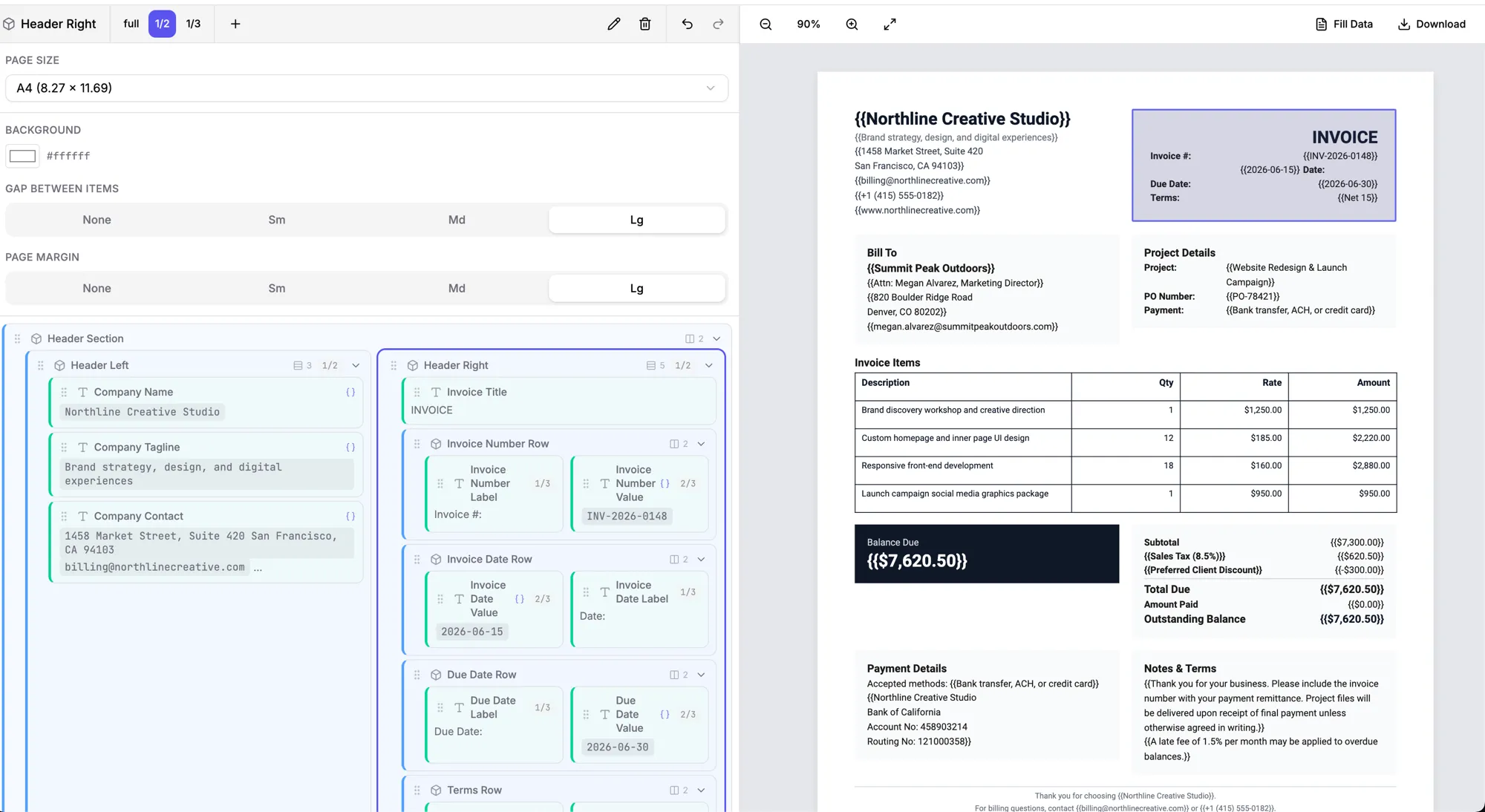
Drag-and-drop editor
Build your layout visually — text, tables, columns, images, dividers — with full control over page size, margins, fonts, colors, and spacing. Design it the way you’d build a slide.
Dynamic fields
Mark the parts that change as variables — customer name, line items, totals, dates, logos — and lock the rest of the design, so it never drifts from document to document.
Reusable by design
Design a template once, then use it forever. Fill it with different data every time instead of rebuilding the document by hand — and update the template any time without starting over.
AI template assistant
Don’t want to start from a blank canvas? Describe the document and Quill builds the whole template for you — then edit it by chatting: “make the totals bold,” “add a notes section.”
Structured, pixel-perfect layout
Tables, totals, headers, footers, and page breaks reflow cleanly as your data changes — long names and big line-item lists never break the design.
Fill it in or share
Fill the template yourself, or share a link so a teammate completes it in the browser — no login, no design software, no code.
How it works
From blank canvas to reusable template
- 01
Start blank or from a template
Open a blank canvas, or start from a ready-made invoice, certificate, report, or contract template.
- 02
Design it visually
Drag in text, tables, columns, images, and your logo. Set the page size, margins, fonts, and styles until it looks exactly right.
- 03
Add dynamic fields
Mark the parts that change as variables. The layout stays locked; only the data swaps in each time.
- 04
Reuse it
Fill the template with data and download the finished PDF — one document or thousands, all from the same design.
Templates
What you can build
Any business document that follows the same layout every time — invoices, receipts, certificates, reports, contracts, statements, and forms.
Quill AI
Or just describe it, and let AI build the template
Type “a professional invoice with a dark header, a line-items table, and payment terms,” and Quill designs the whole template — sections, columns, tables, and the dynamic fields. Then refine it by chatting.
FAQ
Frequently asked questions
What is a PDF template builder? +
A PDF template builder lets you design a reusable PDF — like an invoice, certificate, or report — once, in a visual editor, then fill it with different data every time instead of recreating it by hand. PDFMakerAPI’s builder is fully visual and no-code: drag in text, tables, images, and your logo, and mark the parts that change as dynamic fields.
Do I need to know how to code? +
No. The builder is drag-and-drop — you design the layout visually, the way you’d build a slide. Anyone on your team can create or edit a template without writing code or installing design software.
Can I add fields that fill in automatically? +
Yes. Add dynamic fields (variables) anywhere in the template — customer name, line items, totals, dates, logos — and lock the rest of the design. Each time you use the template, only those fields change.
Can I reuse a template for many documents? +
That’s the point. Design the template once, then create as many documents as you need from it — each filled with different data. Update the template any time without starting over.
Can non-designers build templates? +
Yes — and you can let the built-in AI assistant (Quill) do the heavy lifting: describe the document you want and it builds the whole template, or tell it what to change in plain English.
Is there a free version? +
Yes — start free with 100 PDFs per month, no credit card. Build templates and create documents on the free tier.
Build your first template free
Design a reusable PDF template in the visual editor and create your first document in minutes. 100 PDFs/month free — no credit card.
Start Free