Generate editable invoice & receipt PDFs
Design your own invoice in the visual template designer, or start from a ready-made template — then fill in the details, or share a link so anyone on your team can complete it right in their browser. Download a polished, editable PDF, or generate invoices at scale via the REST API, no-code automation, or your AI agent.
See it in action
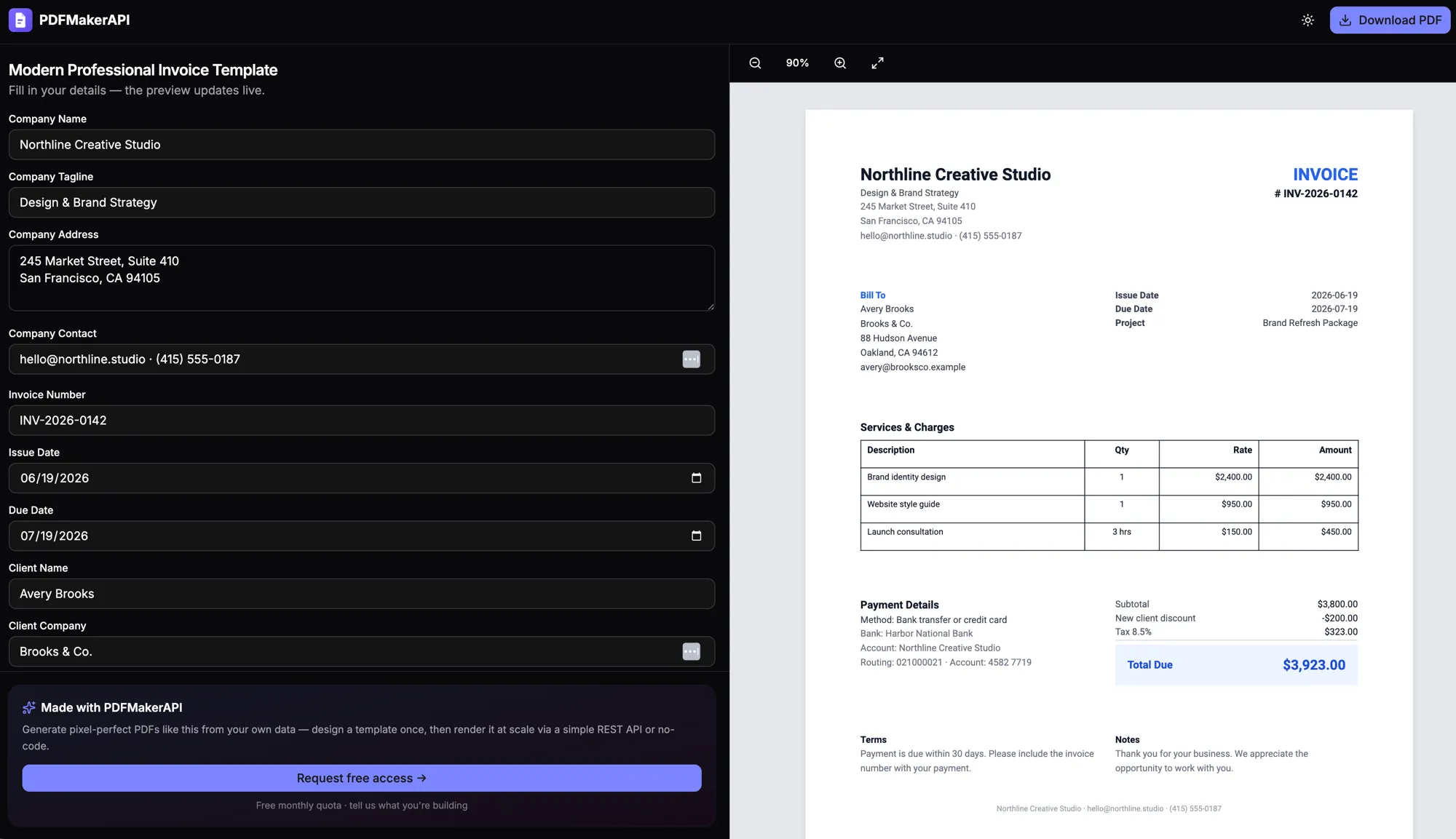
Fill it in, watch it render
Edit any field and the preview updates live — or share a fillable PDF form link so anyone on your team can fill it in right in their browser. Download the finished PDF anytime.
Design your own — or use a template
Build an invoice from scratch in the visual, drag-and-drop template designer, or start from a ready-made template and make it yours — your logo, colors, fonts, and layout.
Share a fill-in link
Send a link and anyone on your team can fill in the details right in their browser — no login, no design tools, no code. The editable PDF is ready to download when they’re done.
Editable, not one-shot
Every invoice is an editable document — change any field and watch the preview update live before you download the final PDF.
Driven by your data
Pass line items, customer details, tax, and totals as JSON. Tables and totals render dynamically and recalculate, however many rows you send.
On-brand every time
Your branding lives in the template, so every invoice and receipt comes out consistent and professional, automatically.
Create it your way
Generate invoices from code via the REST API, from no-code tools like Zapier, Make, and n8n, or just by asking Claude or ChatGPT.
FAQ
Frequently asked questions
How do I create an invoice PDF? +
Design your own invoice template or start from a ready-made one, fill in your company, client, line items, and totals, and the preview updates live. Download the finished PDF — or automate it via the REST API or an AI agent.
Can I design my own invoice template? +
Yes. Use the visual drag-and-drop template designer to build an invoice from scratch — placing text, tables, your logo, and totals exactly where you want — or start from a ready-made template and customize the branding and layout.
Can someone without technical skills create an invoice? +
Yes. Share a link and anyone on your team can open it in their browser and fill in the details — no login, no design tools, and no code. When they’re done, the editable PDF is ready to download.
How do I generate invoice PDFs with an API? +
Create an invoice template with placeholders for the customer, line items, and totals, then POST a JSON payload to the render endpoint. PDFMakerAPI returns a finished, editable invoice PDF you can store or send.
Are the invoices editable after they are generated? +
Yes. Unlike one-shot renderers, you get back an editable document: open the link, change any field — company, client, line items, tax, notes — and the PDF updates before you download it.
Can invoices have a dynamic number of line items? +
Yes. Line items can be added in the editor or passed as a JSON array, and the template renders one row per item, recalculating subtotals, tax, and totals automatically.
Can I generate receipts the same way? +
Absolutely — receipts use the same fill-in-and-render workflow. Many teams keep separate invoice and receipt templates and produce both from the same data.
Can I make an invoice in ChatGPT or Claude? +
Yes. Connect PDFMakerAPI to ChatGPT or Claude and describe the invoice in plain English — it returns a link to an editable invoice PDF you can tweak and download.
Start generating PDFs today
Generate editable invoices, receipts, and certificates from your data, a template, or a prompt. Start free with 100 PDFs every month — no credit card required.
Free — 100 PDFs/mo, no credit card.