Stop Letting AI Generate Your PDFs From Scratch
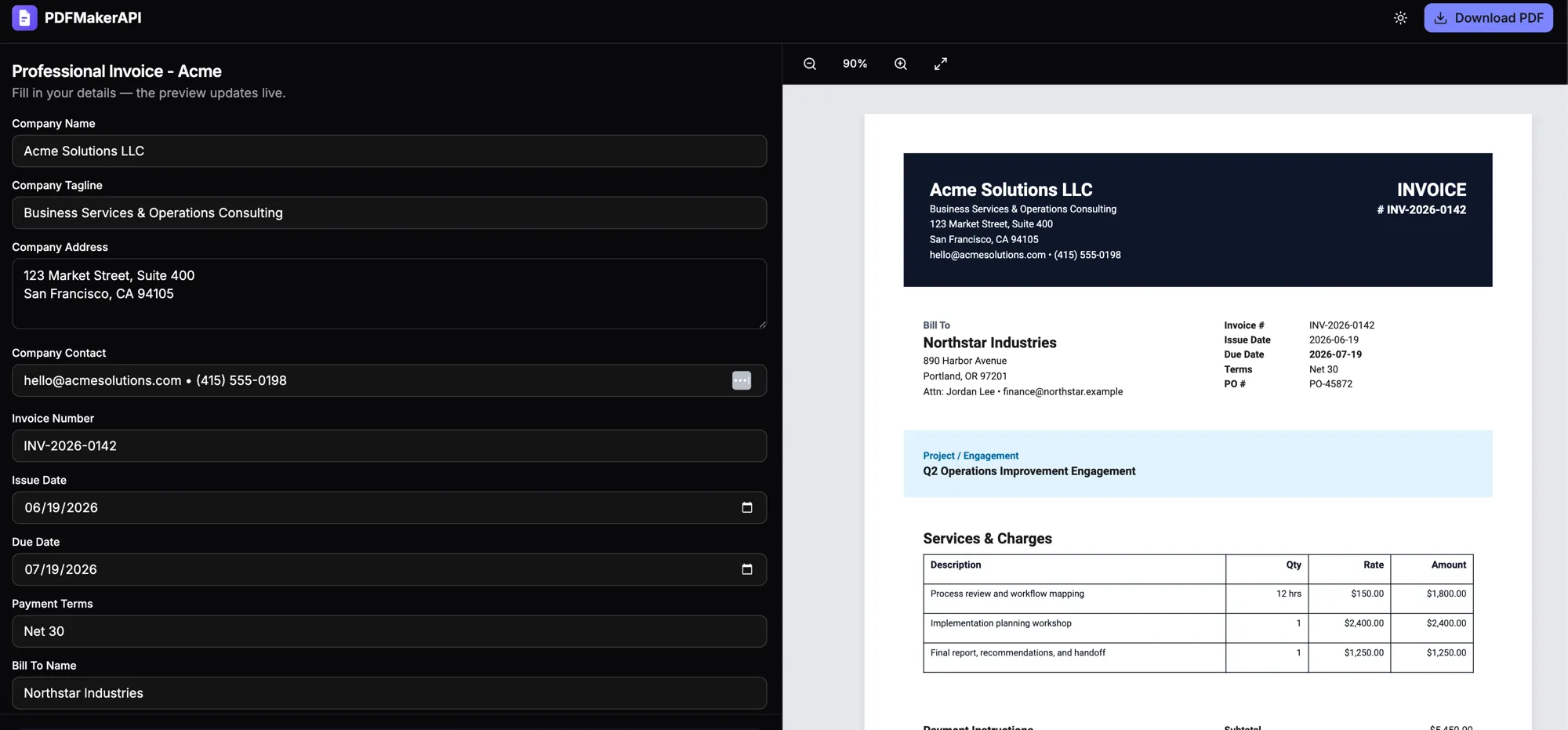
AI agents are getting weirdly good at doing work.
Ask Claude, ChatGPT, Cursor, or any coding agent to “make me an invoice PDF,” and it will usually try. It might write Python with ReportLab. It might generate HTML and CSS. It might spin up Playwright. It might patch a few layout bugs, retry the render, and eventually hand you a PDF.
At first, that feels magical.
Then you ask it to do the same thing again tomorrow.
And it rebuilds the whole thing from scratch.
Different spacing. Different column widths. Different font choices. Maybe the address block moved. Maybe the footer disappeared. Maybe it handled long line items differently this time.
That is not automation.
That is a very expensive intern redrawing your invoice every time you need one.
The problem is not AI-generated documents
The problem is using an LLM as a layout engine.
LLMs are great at:
- understanding what kind of document you need
- extracting the right fields
- transforming messy input into clean structured data
- deciding which template should be used
- writing customer-specific language
- filling missing-but-obvious values
They are bad at:
- pixel-perfect layout
- consistent spacing
- deterministic rendering
- pagination
- table overflow
- preserving brand rules
- generating the exact same output every time
That matters because most business documents are not creative writing exercises.
Invoices, receipts, certificates, contracts, reports, order forms, proposals, and onboarding packets usually follow the same structure every time.
The data changes.
The layout does not.
So why are we asking the model to regenerate the layout on every request?
You are paying the model to re-solve a solved problem
Imagine this invoice data:
{
  "customer": "Acme Inc.",
  "invoice_number": "INV-1048",
  "due_date": "2026-07-24",
  "line_items": [
    { "description": "API usage", "quantity": 1, "amount": "$480.00" },
    { "description": "Support plan", "quantity": 1, "amount": "$199.00" }
  ],
  "total": "$679.00"
}
That data is tiny.
But when you ask an AI agent to generate the PDF from scratch, it does not just output that data. It generates layout code too.
It has to decide:
- page size
- margins
- typography
- table structure
- column widths
- header placement
- footer placement
- colors
- spacing
- overflow behavior
- PDF rendering library
- error handling
Then it has to run the code.
Then it has to fix the code.
Then it has to hope the next invoice still fits.
Now multiply that by 1,000 invoices.
You do not have one reusable document workflow.
You have 1,000 tiny code generation projects.
That is the hidden tax of AI-generated PDFs.
The output drifts because the model is doing too much
This is the part that makes AI document generation dangerous for real workflows.
A human sees this prompt:
Make an invoice for Acme Inc. with these line items.
An LLM sees an open-ended generation task.
It might produce a good invoice. But unless you force the layout into a deterministic system, the model has room to improvise.
And improvisation is exactly what you do not want in business documents.
You do not want invoice #1048 to use a slightly different layout than invoice #1049.
You do not want your certificate title centered one day and slightly off-center the next.
You do not want a contract clause to wrap differently because the model changed the font size.
You do not want a customer report to break because one field was longer than expected.
For one-off documents, this is fine.
For automated document generation, it is a bug.
The better pattern: separate layout from data
The fix is boring.
That is why it works.
Design the document once.
Then generate it forever with data.
Instead of asking the LLM to generate the entire PDF every time, give it a much smaller job:
Understand the request and produce structured JSON.
Then let a deterministic renderer handle the layout.
The workflow becomes:
User request
   ↓
AI agent extracts structured data
   ↓
Reusable PDF template receives data
   ↓
PDF renderer generates consistent output
The LLM is still useful.
It is just not pretending to be a PDF layout engine anymore.
What this looks like in practice
Instead of asking an agent:
Create an invoice PDF from scratch.
Ask it:
Use the invoice template and fill it with this customer data.
The model should only need to produce something like this:
{
  "template_id": "invoice",
  "data": {
    "customer_name": "Acme Inc.",
    "invoice_number": "INV-1048",
    "due_date": "2026-07-24",
    "line_items": [
      { "description": "API usage", "quantity": 1, "amount": "$480.00" },
      { "description": "Support plan", "quantity": 1, "amount": "$199.00" }
    ],
    "total": "$679.00"
  }
}
That is the right job for an LLM.
Small output.
Structured data.
Easy to validate.
Cheap to retry.
No layout drift.
No surprise CSS.
No headless browser roulette.
This is why I built PDFMakerAPI
PDFMakerAPI is built around this exact idea:
Design the PDF template once. Generate finished PDFs by sending data.
You can create reusable templates visually, then fill them through an API, no-code workflows, or AI agents.
The important part is that the template is reusable.
The AI does not need to redraw the invoice.
It does not need to re-invent the table.
It does not need to decide where the logo goes.
It just sends data.
The layout engine does the boring deterministic work.
That is how document automation should work.
Using it from an AI agent with MCP
With MCP, an agent like Claude, Cursor, or ChatGPT can call a document generation tool instead of writing PDF code.
The agent receives a request like:
Make an invoice for Acme Inc. for API usage and support, due net 30.
Instead of generating layout code, the agent calls a tool with structured data. Conceptually:
{
  "template_id": "invoice",
  "data": {
    "customer_name": "Acme Inc.",
    "payment_terms": "Net 30",
    "line_items": [
      { "description": "API usage", "quantity": 1, "amount": "$480.00" },
      { "description": "Support plan", "quantity": 1, "amount": "$199.00" }
    ],
    "total": "$679.00"
  }
}
The result is a finished PDF using the same template every time.
Same spacing. Same fonts. Same table. Same brand. Different data.
That is the entire point.
Using it from an API
The same pattern works without an agent. Your app sends JSON:
curl https://api.pdfmakerapi.com/v1/render \
  -H "Authorization: Bearer YOUR_API_KEY" \
  -H "Content-Type: application/json" \
  -d '{
    "template_id": "invoice",
    "data": {
      "customer_name": "Acme Inc.",
      "invoice_number": "INV-1048",
      "total": "$679.00"
    }
  }' \
  --output invoice.pdf
Now your document generation is just part of your application.
No prompt loops. No generated layout code. No “let me fix this PDF script” step. No inconsistent output.
Bulk generation should not mean bulk prompting
This is where the difference becomes obvious.
Bad pattern:
Prompt the AI 1,000 times.
Generate 1,000 different pieces of layout code.
Render 1,000 PDFs.
Hope they match.
Better pattern:
for invoice in invoices:
    response = requests.post(
        "https://api.pdfmakerapi.com/v1/render",
        headers=headers,
        json={"template_id": "invoice", "data": invoice},
    )
    with open(f"{invoice['invoice_number']}.pdf", "wb") as f:
        f.write(response.content)
That is real automation.
The template is already designed. The layout is already solved. The only thing changing is the data.
When AI-generated PDFs are still fine
To be fair, there are cases where generating a PDF from scratch is totally reasonable.
If you need a quick one-off mockup, a temporary chart, or a throwaway internal document, let the model improvise. That is fine.
The problem starts when the document matters.
If it needs to be reused, branded, audited, emailed to customers, generated in bulk, or produced consistently, then “AI, please make me a PDF” is the wrong abstraction.
The better abstraction is:
AI, understand the request and fill the right template.
The future is not AI drawing boxes forever
AI agents should not be spending tokens deciding where an invoice table goes.
They should not be writing and rewriting PDF layout code for documents your company already standardized months ago.
They should understand intent, prepare data, call tools, and let deterministic systems do deterministic work.
That is the pattern that scales.
Use AI for the messy human part. Use templates for the boring layout part.
Design once. Generate forever.
You can try the workflow with PDFMakerAPI — reusable PDF templates, visual editing, API generation, and MCP support for AI agents.
The next time an AI agent starts writing 200 lines of PDF layout code, ask yourself:
Did I need a smarter model, or did I just need a reusable template?
Frequently asked questions
Why is generating PDFs from scratch with AI wasteful?
The layout of a business document almost never changes — only the data does. Asking an LLM to regenerate the entire layout (positioning, fonts, tables, pagination, error handling) on every request burns tokens re-solving a solved problem, produces inconsistent output run to run, and breaks at scale.
How should AI agents generate documents instead?
Separate layout from data. Design the document once as a reusable template, then have the agent produce only the structured data and call a deterministic renderer — a REST API or an MCP tool — to fill the template. Same layout every time, far fewer tokens, easy to validate.
Can Claude or ChatGPT fill a PDF template via MCP?
Yes. With an MCP server like PDFMakerAPI's, an agent calls a create_document tool with structured data instead of writing PDF layout code — and gets back a finished, editable PDF that uses the same template every time.