How to Create PDFs in ChatGPT
Last updated: June 19, 2026
Make professional invoices, certificates, reports, and resumes without leaving the chat — in seconds. Just describe what you need and the PDF Maker GPT designs it, hands you an editable link, and lets you download a pixel-perfect PDF.
No API key · No design tools · Powered by PDFMakerAPI
Can ChatGPT create PDFs on its own?
Not polished ones. Ask ChatGPT to “make a PDF” and you’ll usually get plain text or Markdown you have to format yourself — or, with Code Interpreter, a basic PDF generated by a Python library with rough spacing, generic fonts, and tables that rarely look professional. There’s no easy way to tweak the result or keep it on-brand.
The PDF Maker GPT fixes that: it designs a proper, branded layout — headings, columns, tables, and totals — and returns a live, editable preview you can adjust before downloading. No code, no copy-paste, no design tools.
| Method | What you get |
|---|---|
| Ask ChatGPT to write it | Plain text / Markdown — you format and export it yourself. |
| ChatGPT Code Interpreter | A basic PDF, but rough layout, generic fonts, and limited styling. |
| PDF Maker GPT | A polished, branded, fully editable PDF in seconds — no code. |
See it in action
From prompt to polished PDF
Ask PDF Maker for a document and it returns a link that opens in a live editor — change any field and the preview updates instantly, then download the finished PDF.
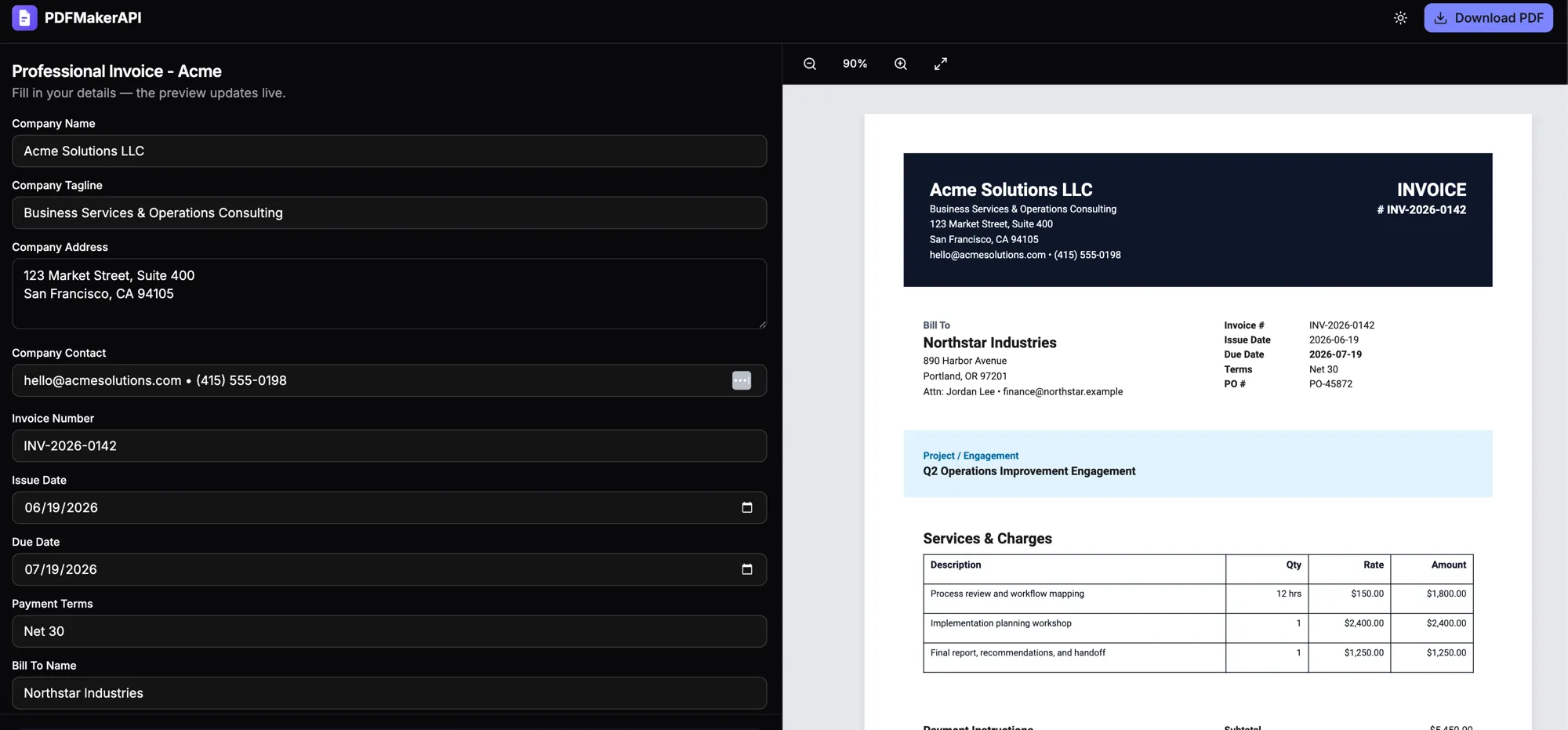
Try this prompt
“Make a professional invoice for Acme with 3 line items.”
The same approach works for invoices & receipts, certificates, and reports & statements — and you can generate them at scale via the PDF API or check pricing.
How it works
From a sentence to a finished PDF
Open the PDF Maker GPT
Launch PDF Maker in ChatGPT — no setup, no API key, no install.
Describe your document
Ask in plain English: "an invoice for Acme with 3 line items," "a course completion certificate," or "a clean one-page resume."
Get an instant link
PDF Maker designs a complete, professional document and hands back a link that opens it in a live preview.
Edit & download
Tweak any field in the preview, then download a pixel-perfect PDF. The whole thing takes seconds.
What you can make
Any document, just by asking
Describe it in plain English and PDF Maker handles the layout — headings, tables, columns, and your real data.
FAQ
Frequently asked questions
How do I create a PDF in ChatGPT? +
Open the PDF Maker GPT in ChatGPT and describe the document you want — for example, "make an invoice for Acme with three line items." PDF Maker builds a complete, professional layout and returns a link. Open it to preview, edit any field, and download the finished PDF.
Is the PDF Maker GPT free? +
Yes. Creating documents with the PDF Maker GPT is free to use inside ChatGPT. It's powered by PDFMakerAPI, which also offers a free tier of 100 PDFs per month if you want to generate documents programmatically via API.
What kinds of documents can it make? +
Invoices, receipts, certificates, business reports, resumes, offer and cover letters, quotes, statements, and more. If you can describe it, PDF Maker can lay it out — with headings, tables, columns, and your real data.
Can I edit the document after ChatGPT creates it? +
Yes. The link PDF Maker returns opens a live editor where you can change any text, value, or table row and see the preview update instantly before downloading the PDF.
Do I need ChatGPT Plus? +
You need a ChatGPT account to use custom GPTs. Availability of GPTs depends on your ChatGPT plan, but the PDF Maker GPT itself is free to use — there is no separate charge from us to create documents.
How is this different from the PDFMakerAPI? +
The GPT is the easy, conversational way to make one-off documents inside ChatGPT. PDFMakerAPI is the platform behind it — generate editable PDFs from your data, a template, or a prompt; fill one in or share a link for anyone to complete in their browser; or automate at scale via the REST API, no-code tools, and AI agents.
Create your first PDF in ChatGPT
Open the free PDF Maker GPT, describe your document, and download a polished PDF in seconds.